


Meeting Guide
4.61.62K Reviews
App Specs
- Version
- 5.1.14
- Updated On
- License
- Free
- Downloads
- 1,000,000+
- Developer
- A.A. World Services, Inc.
- Categories
- Lifestyle
- Platform
- Android, iOS
Screenshots


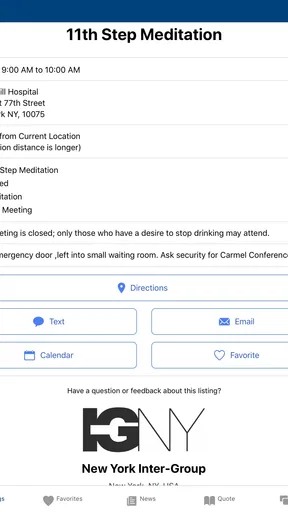
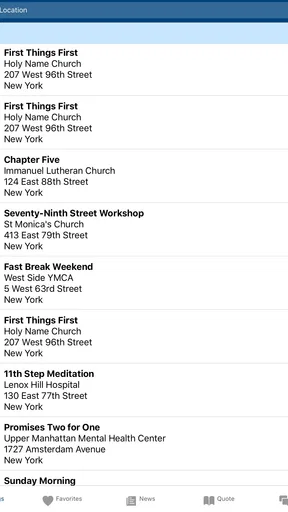
 Analysis by AppCompare
Have you ever wished there was an app that could just make finding meetings super easy and efficient? Well, let me introduce you to the Meeting Guide. This app is like having a personal meeting assistant in your pocket. It’s designed to help you track down meetings anywhere and anytime with a simple tap on your phone. Whether you’re a frequent traveler or just someone looking for support in your local community, this app is a lifesaver.
A useful first step when plans change
I find a meeting finder most valuable when I need a practical next step rather than a broad directory of recovery resources. If I have moved to a different neighborhood, am visiting family, or have a gap in my schedule, the key question is simple: what meeting might fit where I am and when I am free? That focused purpose is what makes this lifestyle app worth considering. It is made by A.A. World Services, Inc., and its free access makes it easier to try without turning a sensitive search into a purchase decision.
A realistic example is arriving in an unfamiliar part of town earlier than expected and wanting to check whether there is a suitable meeting nearby. Instead of relying on a general web search with results that may mix unrelated organizations, I can use this dedicated guide as a starting point, then check the meeting details and plan the trip. I would still treat the listing as a lead to verify if timing or location is especially important; a meeting directory can help me find an option, but it cannot remove every uncertainty from real-world plans.
Getting Started with Meeting Guide
First things first, let’s talk about getting started. Downloading the app is as straightforward as it gets. Available on both Android and iOS, you can find it in your respective app store. Once installed, you’re greeted with a clean and intuitive interface. I mean, who doesn’t love an app that’s easy on the eyes?
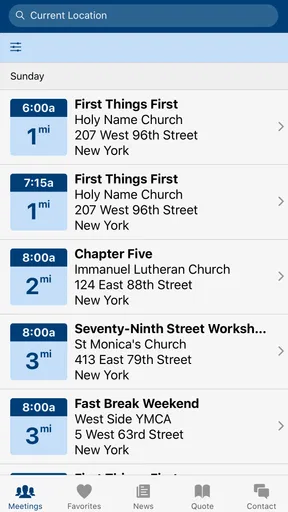
Now, the beauty of this app lies in its simplicity. It doesn’t bombard you with unnecessary features or complicated menus. Instead, it focuses on what matters most: helping you find meetings. With location services enabled, it automatically detects your location and lists meetings nearby. You can refine your search by day, time, or type of meeting, making it super personalized.
Readability, navigation, and choosing a meeting
When I am using a meeting guide for something personal, I want the essential information to be easy to locate and the choices to feel manageable. The uncluttered approach described here suits that need: the app is centered on finding meetings instead of surrounding the search with unrelated material. Filtering by day and time can also make a practical difference. Rather than scanning every listing, I can narrow the search to the window that works for me, then compare the remaining options.
One useful habit is to decide what matters before opening the search: the day I can attend, whether I need an in-person or virtual option, and whether I want to look near my current location or somewhere I am heading. That order helps keep the results purposeful. It also avoids assuming that the nearest listing is automatically the best one; a meeting’s format and schedule may matter more than a short distance.
Worth Reading Before You Choose

EA SPORTS FC Mobile 26 Is a Bigger Football Game, but It Takes Time

Flipboard Shows What News Apps Must Do Beyond the Feed

Switching to Android Auto Means Rethinking Your Driving Routine

Google Calendar Makes a Crowded Week Easier to Manage

Ludo King Makes the Most of the Minutes Between Plans

Baby Panda World Brings Quick Play to Modern Phones, but Its Game Library Feels Busy
Location-based results are convenient, but location access is not the only sensible way to approach a search. If I would rather not have my phone identify where I am, I can consider searching around a destination or using the available day and time choices to shape the search, where those options are offered. I would not grant location access automatically just because the app offers it. For a quick nearby search it can save effort; for planning ahead, choosing the relevant area myself may feel more comfortable.
Features That Stand Out
Alright, let’s dive into some of the features that really make the app shine. One of my favorites is its real-time updates. You’re always getting the most current information about meetings, which is crucial if you’re someone who relies on these gatherings for support.
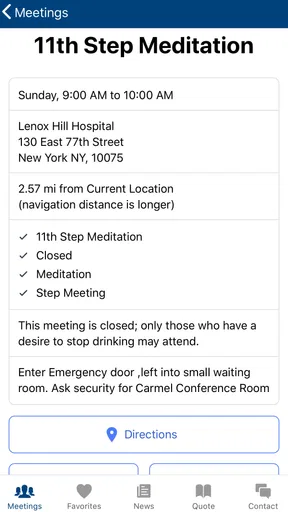
Another great feature is the filtering option. You can filter meetings by their format—whether you’re looking for open, closed, or even virtual meetings, it’s all there. Plus, the app supports multiple languages, making it accessible to a wider audience. It’s like having a global community at your fingertips.
Those filters are especially useful when a person is new to the local options and does not yet know which listing will suit them. I would use them to make a shortlist, not as a substitute for deciding what feels appropriate. If I am unsure what a meeting format means or whether I am eligible to attend, it makes sense to ask a trusted local contact or consult the relevant group rather than guess from a label. The directory can help me locate possibilities; the choice still belongs to me.
There is also a practical trade-off in the promise of current listings. Fresh information is important, but meeting schedules and arrangements can change, and a phone screen cannot guarantee that every detail will remain correct until I arrive. Before making a long trip or relying on a meeting at a particularly tight time, I would recheck the listing and use any available contact details to confirm. For an ordinary nearby search, the guide can save time; for a high-stakes plan, a quick confirmation is worth the extra step.
And let’s not forget the map view. If you’re more of a visual person like me, you’ll appreciate the map option. It shows you exactly where each meeting is located, and you can even get directions directly from the app. Talk about convenience!
Motor and sensory considerations
A map can reduce the mental effort of translating a list of place names into a route, especially in an unfamiliar area. At the same time, a map is not the best view for everyone or every moment. If I am standing outside in bright daylight, dealing with a small screen, or trying to keep my attention on my surroundings, a straightforward list may be easier to scan than a detailed visual display. I would choose the view that lets me check the next step quickly, rather than assuming one presentation works equally well for all users.
For motor access, the main advantage is that a focused search can mean fewer steps than browsing several unrelated sites. The limitation is that any phone-based search still asks me to tap, read, and make choices on a handheld screen. If using a phone is tiring, or if small controls are difficult to manage, it may be easier to ask someone trusted to help locate an option or to plan the search in a calmer setting. I would not treat the app as a replacement for another person’s support when that is what makes the process comfortable.
Language choice can also affect how usable a directory feels. Support for multiple languages may help people who prefer not to search in English, but it does not mean every meeting or every detail will be presented in a language that suits each person. I would check the information attached to an individual listing and, where needed, ask about the language used at that meeting before setting out. That small check can prevent the frustrating mismatch of finding a convenient time but an unsuitable conversation.
Using Meeting Guide on the Go
One of the things I love about the app is how it fits seamlessly into a busy lifestyle. Whether you’re traveling for work or on a family vacation, finding a meeting becomes a stress-free experience. You can plan your day around your meetings, knowing you have reliable information right on your phone.
For anyone who’s ever been in a new city and needed to find a meeting, you know how daunting it can be. This app takes away that anxiety by providing accurate, up-to-date details, ensuring you never miss out on the support you need.
Planning around real life
For travel, I would search before leaving rather than wait until I have reached the destination. That gives me time to compare meeting times with transport, family plans, or work commitments, and to note more than one possible option if my day shifts. It is a small workflow, but it makes a directory more useful: look ahead, narrow by schedule and format, check the location, then confirm anything that would be costly to get wrong.
For someone who already knows their local routine, the app may work best as a backup rather than something to open every day. It can help when a usual meeting is not convenient or when a visitor asks for nearby options. For a newcomer, it offers a way to discover possible meetings without first knowing the names of local groups. In both cases, I would see it as a bridge to the meeting itself, not as a place to replace conversation or community.
Compared with a general map app, this guide is more directly focused on meeting information, so I do not have to begin with broad search terms and sort through unrelated places. A general map may still be better for comparing transport routes, checking nearby services, or planning a multi-stop trip. Likewise, a local group’s own information may be the better source when I need a specific detail or a last-minute change. I would use the guide to discover options, then use the tool best suited to the next question.
Where the experience may fall short
The app is not the right choice for someone looking for a full recovery program, counseling, or a way to communicate directly with a group. Its central value is locating meetings, so people who want broader guidance will need other sources of support as well. It may also be less useful to someone who already has all the meeting details they need and prefers a personal contact or a printed schedule.
There is a human side to the search that no filter can settle. A listing can help me compare time, format, and location, but it cannot tell me whether I will feel comfortable in a particular room or whether a meeting matches my expectations. If I am uncertain, I can start with a low-pressure plan: identify a possible option, confirm practical details, and decide for myself whether to attend. That is more realistic than expecting an app to make a personal decision on my behalf.
Meeting Guide is free, rated for Everyone, and has a 4.6 average from around 5,000 ratings, with over a million installs. It was released on June 17, 2018, and version 5.1.7 requires Android 7.0 or later. Those details make it clear that this is an established, widely used option, though popularity alone does not guarantee that every listing or workflow will suit every person. I would judge it by whether it helps me find a relevant meeting with less searching.
Final Thoughts
All in all, the app is a must-have for anyone actively participating in meetings. Its user-friendly design, rich features, and real-time updates make it an invaluable tool. It’s like having a community compass guiding you wherever you go. Whether you’re a seasoned member or just starting out, this app makes staying connected to your community easier than ever before.
So, what are you waiting for? Give it a try, and never miss a meeting again. You’ll wonder how you ever managed without it!
Who I would recommend it to
I would recommend this guide to people who want a quick way to explore meeting options in their area, visitors who need to plan around an unfamiliar place, and anyone who prefers a searchable list to tracking down schedules one by one. Its strongest use is practical and specific: helping me move from “I need to find a meeting” to a set of possibilities I can consider. The location, schedule, format filters, and map can each reduce a different part of that search.
I would be less likely to recommend relying on it alone if someone needs extensive accessibility details, direct personal support, or a guarantee that a last-minute schedule has not changed. In those cases, I would pair the search with a direct check or ask a trusted person to help. That is not a flaw unique to this app; it is a sensible limit of using a directory for a real-world, people-centered activity.
An inclusive, practical verdict
My overall impression is that this is a focused tool that can make meeting information easier to reach across different situations, especially when travel, language preference, or a changing schedule complicates the search. It does not need to do everything to be useful. I like that I can use it to explore without committing to a particular meeting, and that I can compare options before deciding what works for me.
Pros
- User-friendly interface for easy navigation.
- Comprehensive list of global meeting locations.
- Real-time updates on meeting changes.
- Offline access to saved meeting info.
- Customizable reminders for upcoming meetings.
Cons
- Limited features without an internet connection.
- Occasional glitches in the search function.
- Some areas lack detailed meeting data.
- No support for landscape mode on tablets.
- Ads can be distracting during use.
FAQs for Meeting Guide
What is the purpose of the Meeting Guide app?
The Meeting Guide app is designed to help users find Alcoholics Anonymous (AA) meetings in their area. It provides real-time data on meeting times and locations, making it easier for individuals seeking support to connect with local groups. The app aims to offer a convenient, user-friendly way to access crucial recovery resources.
How can I find meetings using the app?
Users can search for meetings by entering their location or using the app’s GPS feature to find nearby meetings. The app provides a list of available meetings with details like time, type, and location. Users can filter results based on specific criteria such as open or closed meetings to suit their preferences.
Is the Meeting Guide app free to use?
Yes, the Meeting Guide app is completely free to download and use. It is available on both Android and iOS platforms. There are no in-app purchases or subscriptions required, ensuring that everyone has access to the resources they need without any financial burden.
Does the app require internet access to function?
While the Meeting Guide app does require internet access to update meeting information, users can still access previously downloaded data offline. This means if you have searched for meetings previously, you can still view those details without an internet connection, though real-time updates will be unavailable.
How accurate is the meeting information provided in the app?
The Meeting Guide app aggregates data from various AA service entities to ensure accuracy. However, meeting times and locations can occasionally change. It’s recommended to confirm details with local AA websites or contacts directly if possible, especially during holidays or special events that might affect meeting schedules.


